
After spending the last 3+ years designing AI-native products across healthcare, life sciences, research, enterprise intelligence, and other complex B2B domains, I’ve started to notice a pattern in how AI interfaces are being designed.
We’re still treating a lot of AI interactions as if they were ordinary UI.
A prompt is a text field. A response is a card. A suggestion is a chip. A citation is a small link at the end of a paragraph. A regenerate action is a button.
The model may be radically different from traditional software, but the interface often isn’t.
That feels increasingly limiting.
Because when you actually look at how people use AI in serious workflows, the interaction is rarely just:
ask → answer
People are trying to figure out what they want to ask, give the system enough context to make the answer useful, evaluate whether they trust it, correct what it got wrong, and continue working from what it produced.
That has changed how I think about AI components.
I’m less interested in thinking about them as a collection of “AI patterns” and more interested in the job each interaction is doing in the larger workflow.
Over time, I’ve started grouping those jobs into four areas:
1. Set intent
2. Shape the generation
3. Evaluate the result
4. Correct and continue
The distinction seems small, but it changes quite a lot about how you design.

1. Set intent
One of the easiest things to get wrong with AI is assuming that the user already knows exactly what to ask.
In a lot of the products I work on, especially research-heavy and enterprise ones, people know the problem they’re trying to solve. They just don’t necessarily know the exact query, context, dataset, or combination of inputs needed to get there.
I’ve explored this through keyboard-first query interfaces where the input itself becomes a way of constructing intent.
Instead of making someone navigate through multiple filters or menus, the system can let them reference the things they already work with — a company, person, dataset, research area, workflow, model, or other piece of context — directly within the query.
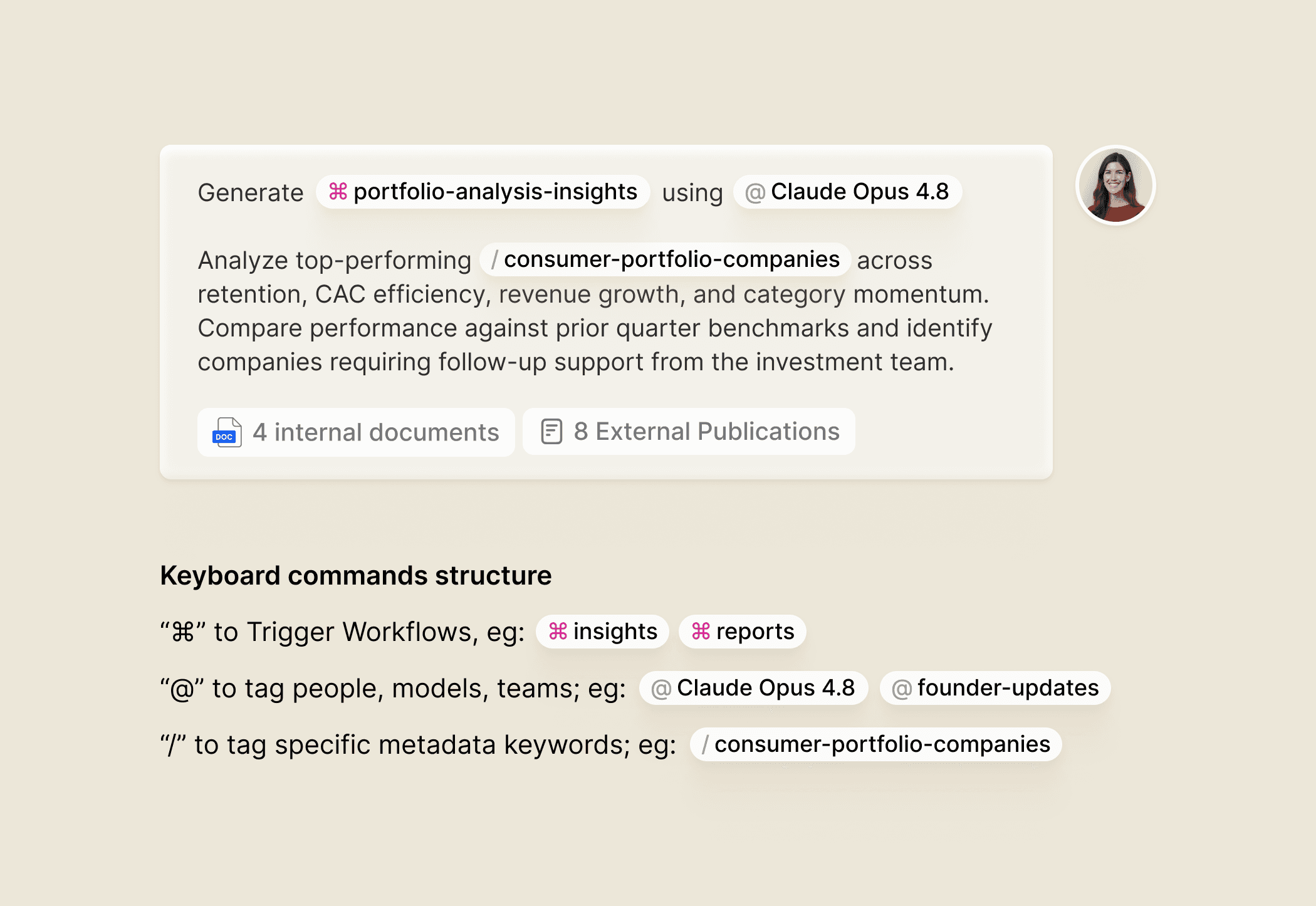
For example, / could surface datasets or research topics, while @ could bring in people, companies, models, or other entities. Other triggers could expose workflows, actions, or automations.
The interesting part wasn’t the syntax itself. It was what the syntax allowed the interface to do: help someone construct intent as they were forming it.
That makes autocomplete a much more interesting pattern in AI products than it is in traditional software.
In a conventional interface, autocomplete is mostly about getting somewhere faster — finishing a word, finding a command, reducing the amount you have to type. In an AI interface, it can also make the system itself more legible. It can show you what exists, what can be referenced, what the system knows about, and even what kinds of things you can ask it to do.
So instead of making someone leave the input, open a filter, find a dataset, select a company, choose a workflow, and then come back to their query, the interface can bring those things into the act of expressing the request itself.
That’s a small shift, but an important one.
The interface isn’t just capturing intent anymore. It is helping the user form it.
I see a similar opportunity in structured inputs.
There’s often a tendency to frame AI input as a choice between a completely open-ended prompt and a rigid form. In practice, I’ve found the useful space to be somewhere in between.
Let me describe what I want naturally, but help me provide the pieces that actually matter: the right context, source, scope, entities, constraints, or output format. The structure should support the intent rather than make me translate my thinking into a form before I can get started.
That’s ultimately the role I want these patterns to play.
Not teaching people how to prompt better, but designing the product so they need to think less about prompting at all.
2. Shape the generation
Once intent is established, the next problem is what the system actually does with it.
This is where I think prompt editors and AI text inputs are particularly interesting.
I recently worked on a knowledge-mining product where the prompt editor could easily have been treated as a text box with a few actions around it.
But the more complex the workflow gets, the less accurate that model becomes.
The prompt is often controlling far more than language.
It can determine which context is considered, which sources are relevant, what the system should ignore, what the output should look like, and how much freedom the model has to interpret the request.
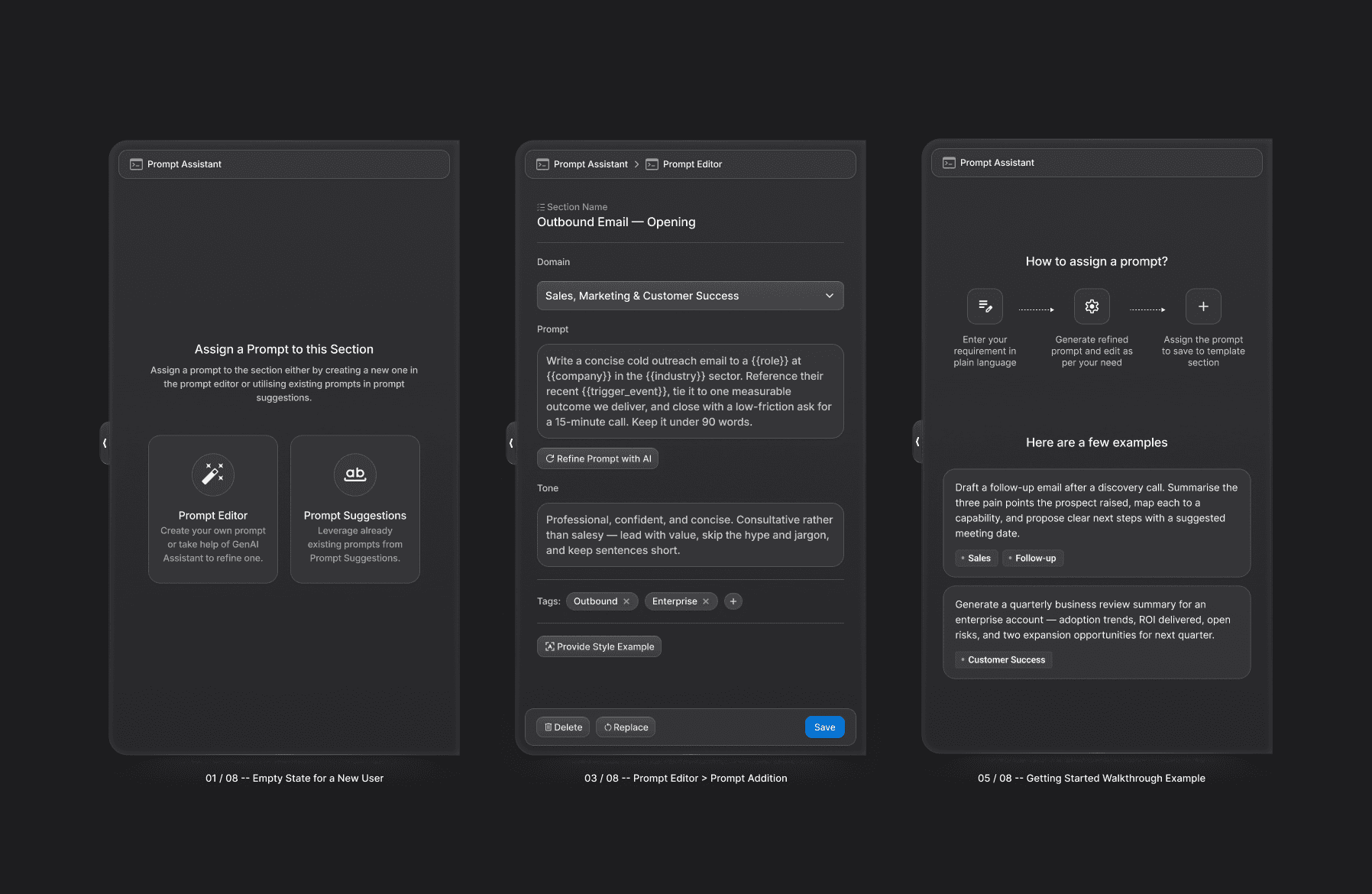
At that point, the surrounding interface becomes part of the reasoning.
How does the user know what context is attached?
Can they distinguish instructions from source material?
Can they reuse something they have already built?
Can they change one constraint without rewriting the whole thing?
Can they understand what the system is actually being asked to do?
And sometimes, the best interaction is to add friction.
If there is an important ambiguity in the request, a clarifying question can be much more useful than confidently producing an answer that needs to be repaired afterwards.
That’s something I find particularly interesting about AI UX: the usual rule that fewer or the least number of interactions are always better doesn’t quite hold for enterprise products.
The right question is not “how do we make this faster?”
It is “where should the work happen — before the generation, or after it?”
3. Evaluate the result
This is probably where I see the biggest gap in current AI products.
We’ve put a lot of thought into helping people get answers.
Much less into helping them decide what those answers are actually worth.
That distinction matters a lot in the kinds of products I work on.
In a research or enterprise workflow, a generated answer is rarely the end of the task. It might inform a decision, become part of an analysis, lead to another question, or need to be shared with someone else.
So the user needs more than an answer. They need enough context to make a judgment about the answer.
This is where seemingly small patterns, like citations, become much more consequential.
A citation sitting at the end of a paragraph technically provides a source. But a citation that lets me open the underlying evidence, inspect it, compare it with another source, and continue researching is doing a much bigger job.
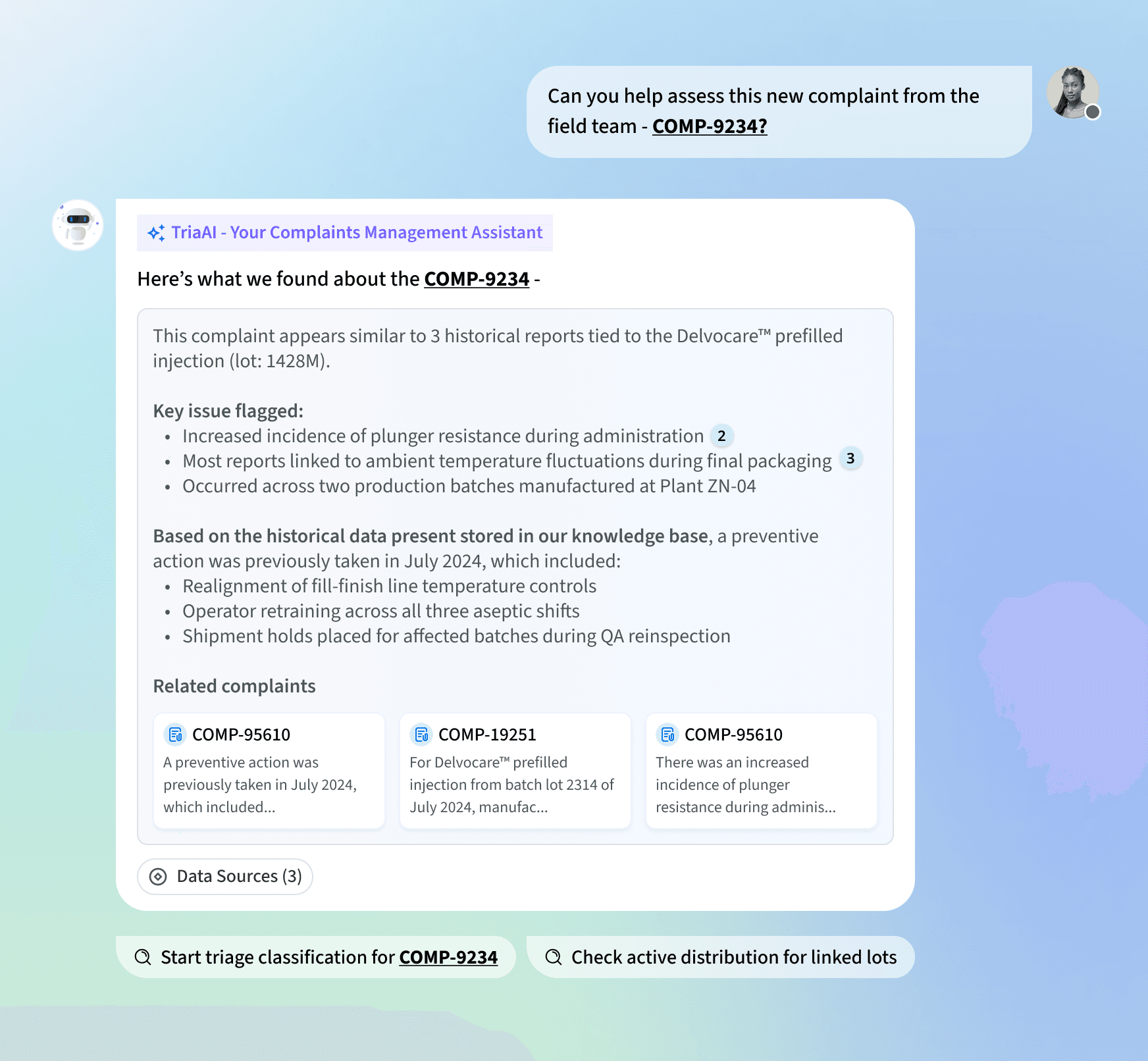
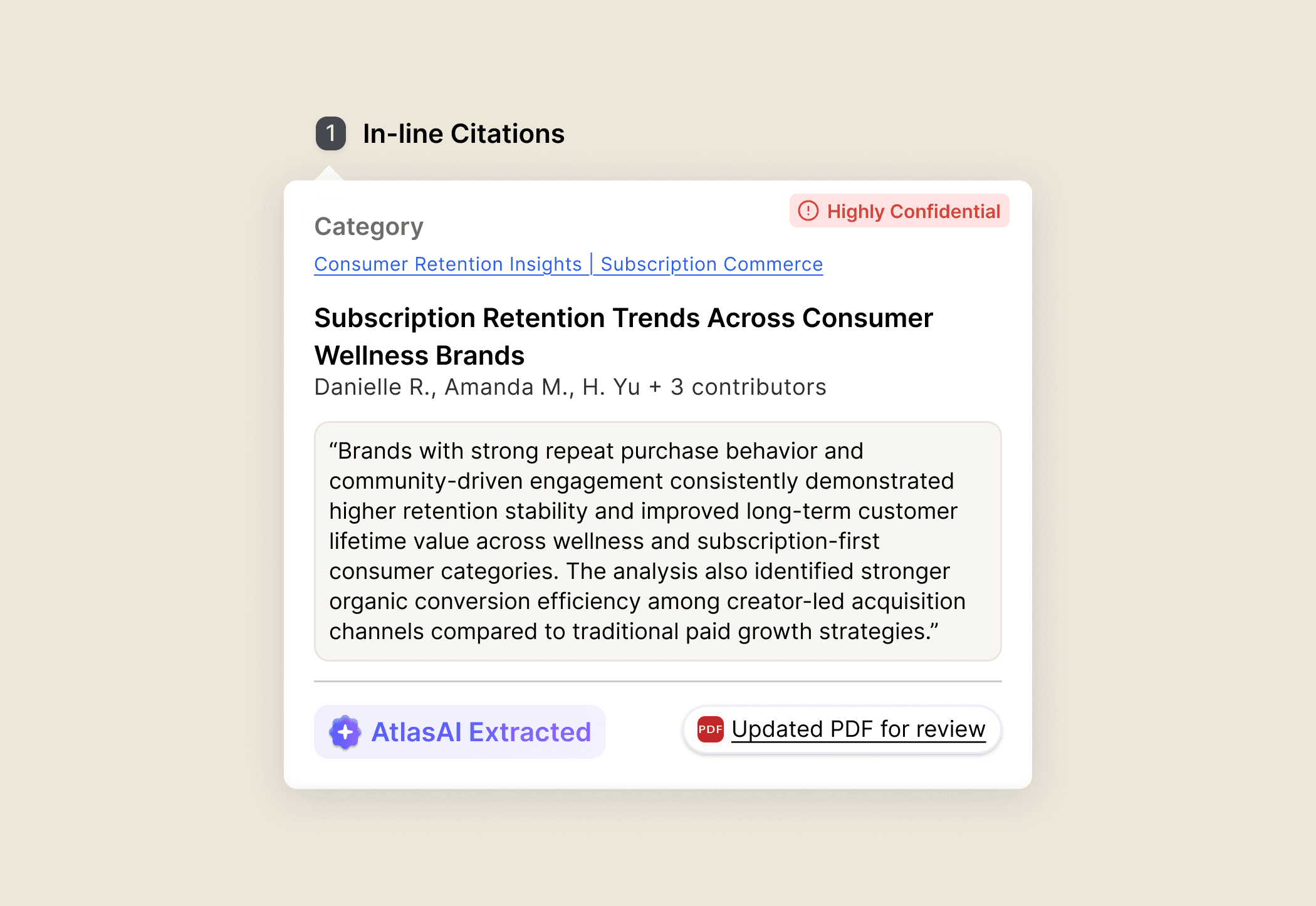
The same applies when the output is structured data or analysis.
If the AI tells me that something changed, I may want to inspect the underlying records. If it identifies a trend, I may want to change the segment and see whether the conclusion still holds. If it gives me a summary, I may want to go back to the source material.
That means the AI output shouldn’t necessarily be treated as a final answer.
It can be another layer of the workspace.
I find this especially important in research products, where the useful state isn’t just the latest response. It’s the collection of searches, sources, findings, comparisons, notes, and decisions built around it.
That context needs somewhere to live in the product; and product should be able to surface and remember it when the user needs it.
4. Correct and continue
This is probably the part of AI UX I find most frustrating today.
The output is close, but not quite right.
One assumption is wrong. One section needs to change. A conclusion is useful but the supporting evidence isn’t. You want to keep most of the result and change one part of it.
And very often, the main option is still:
Regenerate.
That’s a surprisingly crude interaction for a system that is supposed to help with complex work.
If 80% of the result is useful, I shouldn’t have to throw away the 80% because 20% needs work.
This is where things like editing, partial regeneration, branching, comparison, undo, and refinement become much more important.
[IMAGE — refine / edit / regenerate / branch / compare]
The same becomes even more obvious with agentic workflows.
The interaction starts becoming less like:
command → execution
and more like:
generate → inspect → question → refine → retry → compare → continue
The interface needs to support that rhythm.
It needs to preserve state. It needs to show what changed. It needs to let the user intervene without destroying what already works. And when something goes wrong, it needs to provide a path forward.
I think this is also where trust gets misunderstood.
Users don’t necessarily expect AI to be perfect.
They expect to be able to do something when it isn’t.
Being able to correct something, inspect an assumption, change one part of a result, or recover from a bad action can do more for trust than making the AI sound increasingly confident.
One assumption is wrong.
One section needs changing.
The conclusion works, but the evidence doesn’t.
You want to keep 80% of it and rethink the remaining 20%.
And the primary interaction is often still:
Regenerate.
That’s an incredibly blunt control.
If AI is meant to be collaborative, the interface should let me work with an imperfect result rather than make me start again.
→ Edit one part.
→ Change an assumption.
→ Regenerate one section.
→ Branch from the current state.
→ Compare two versions.
→ Preserve what already works.
→ Undo something that went wrong.
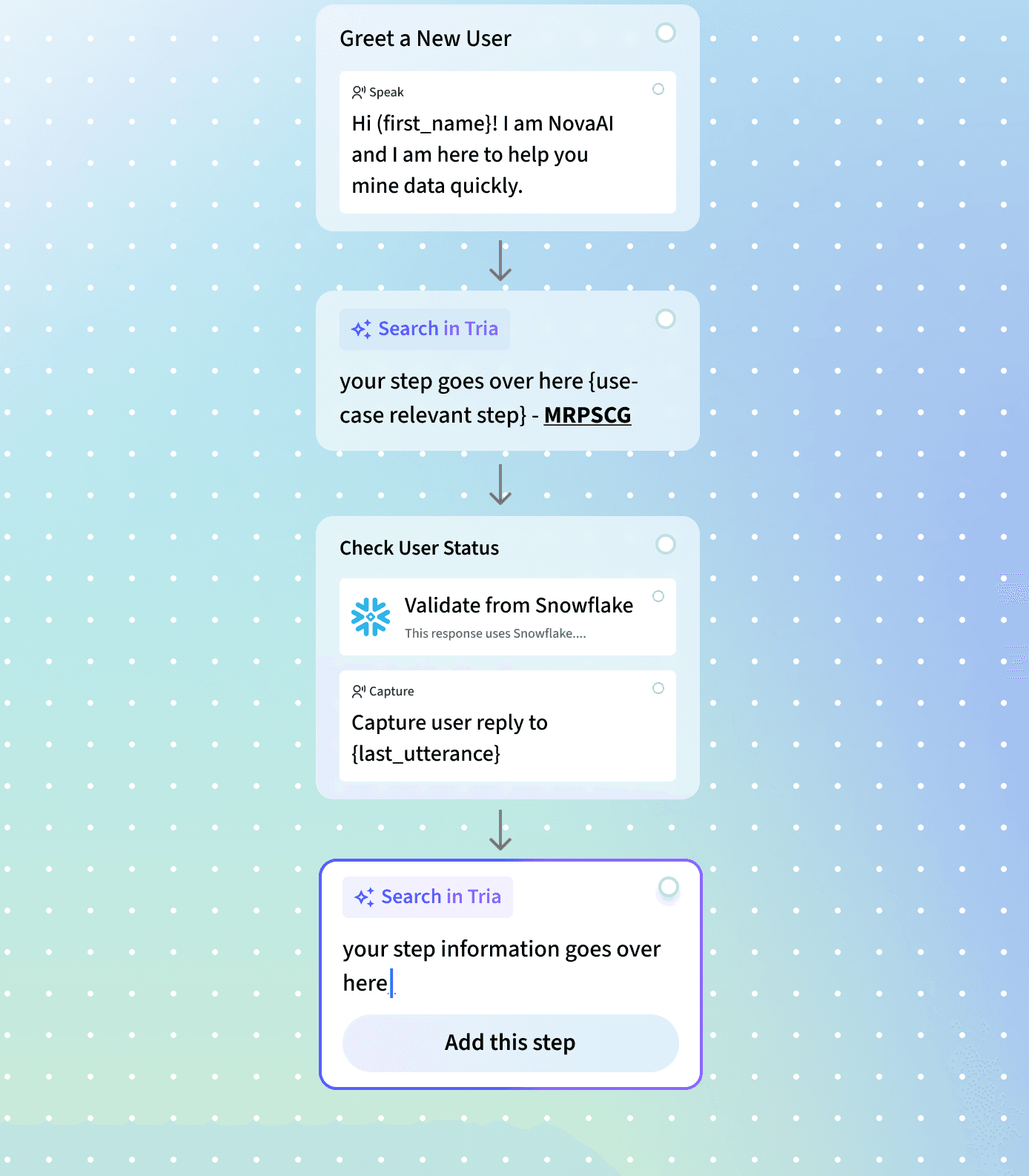
This matters even more with agentic systems.
The interaction starts looking less like:
command → execution
and more like:
generate → inspect → question → refine → retry → compare → approve
The interface needs to support that rhythm.
And this is where trust becomes an interaction problem.
Users don’t necessarily expect AI to be perfect.
They expect to be able to do something when it isn’t.
→ Can I edit this?
→ Can I ask why?
→ Can I retry?
→ Can I change the assumption?
→ Can I see what changed?
Those capabilities often build more trust than simply making the AI sound more confident.
Maybe we’re thinking about AI components the wrong way.
Thinking about these four jobs has made me less interested in defining a generic library of “AI patterns.”
A prompt editor isn’t inherently a good pattern. A citation isn’t inherently a good pattern. A regenerate button isn’t inherently a good pattern.
What matters is what the interaction enables at that point in the workflow.
→ Is it helping me express what I’m trying to do?
→ Is it helping me shape what the system does?
→ Is it helping me understand whether the result is useful?
→ Or is it helping me work with the result once I have it?
That’s why I keep coming back to these four jobs:
Set intent → help me express what I’m actually trying to do.
Shape the generation → help me influence what the system does with it.
Evaluate the result → help me decide whether I can trust and use what came back.
Correct and continue → help me move forward without starting over.
Looking at AI through this lens also explains why so many experiences still feel incomplete.
We’ve spent a lot of effort making it easier to ask, prompt, configure, and generate. The harder design problem is what happens after generation.
What do I do when the output is useful but imperfect? How do I investigate it? Change it? Preserve what worked? Continue from it without starting over?
That’s also why I don’t think the most interesting AI interface is necessarily the most conversational one.
Sometimes it’s a query builder. Sometimes it’s a research workspace. Sometimes it’s an editor, a table, a canvas, or a set of connected sources.
The form of the interface matters less than whether it supports the actual work happening around the model.
The best AI interfaces probably won’t be the ones that make AI feel invisible. They’ll be the ones that make the collaboration between human judgment and machine capability feel unusually clear.
AI doesn’t remove the need for interfaces. It makes the quality of those interfaces matter more — because the interface now has to help people direct, interrogate, correct, and build on something that doesn’t behave predictably.
And that, to me, is the more interesting design problem.
Not how do we design a UI for an AI model?
But how do we design a system that helps a person do better work with one?